


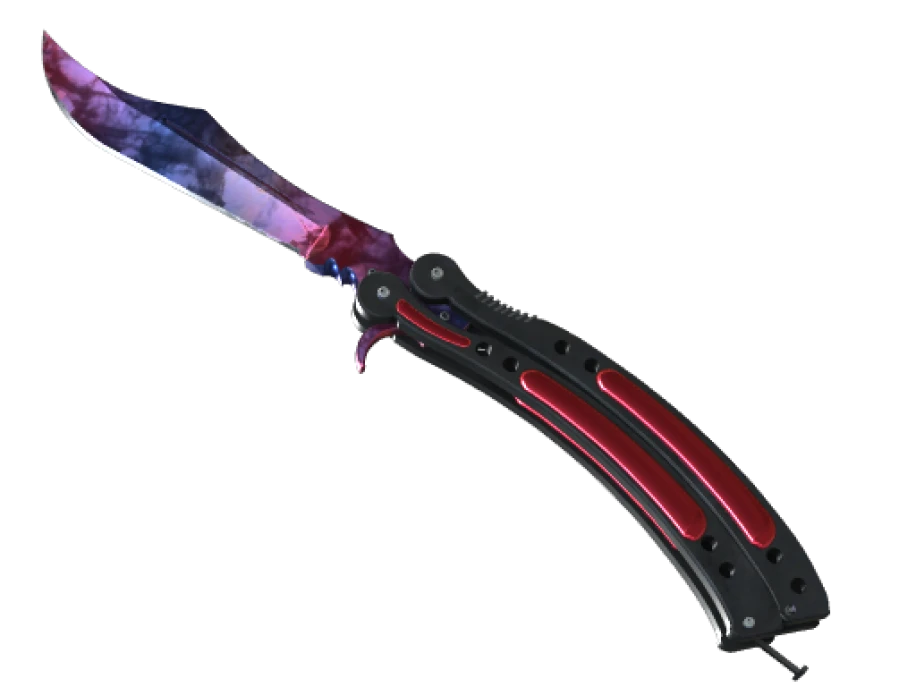
Doppler is a metallic marble finish that came in with the Chroma cases. One name on the market, seven different looks underneath it. If you are about to pay for one, the phase is the first thing to settle, because it moves the price more than the float, the model or anything else on the listing.
How the phase is decided
Doppler is not one paint kit with a lot of variation. It is seven paint kits that share a name. Phase 1, Phase 2, Phase 3, Phase 4, Ruby, Sapphire and Black Pearl are each their own finish with their own paint index, and the game picks one of them when the knife is created. Once picked, it is fixed for the life of the item.
The gem phases, Ruby, Sapphire and Black Pearl, come up far less often than the numbered ones. That is the root of their price.
The pattern index is a separate roll. It does not choose the phase. It shifts where the marbling sits on the blade within whatever phase you got. That is why two Phase 2 knives can be the same phase and still look different, one with pink across the whole playside and one with a blue patch right where you look.
So there are two numbers to care about. The paint index tells you the phase. The pattern index tells you where the colors landed.
What each phase looks like
| Phase | Colors | Quick tell |
|---|---|---|
| Phase 1 | Blue, pink and black in a mix | Dark areas break the pattern up. Neither pink nor blue wins. |
| Phase 2 | Pink with blue, little black | The pink dominates. Most wanted of the four. |
| Phase 3 | Dark, blue with a green tint | Almost no pink. Reads as a dark knife. |
| Phase 4 | Blue with black | Only small traces of pink, if any. |
| Ruby | Deep red with black marbling | No blue, no pink anywhere. |
| Sapphire | Deep blue with black marbling | No pink anywhere. Cleaner and brighter than a Phase 4. |
| Black Pearl | Near black with a purple and green sheen | The color only shows as the light moves. |
The hard cases are Phase 4 against Sapphire and Phase 3 against Black Pearl. A Phase 4 carries black marbling that looks like smoke, and usually a trace of pink somewhere. A Sapphire is a single clean blue with black veins. A Phase 3 shows clear blue when you look for it. A Black Pearl does not, it only shimmers.
Why the gems price apart
Three reasons stack up.
- They are rarer. The roll that produces a gem comes up much less often than a numbered phase.
- They have no bad seeds. A Sapphire is blue from every angle. A Phase 2 can be let down by the pattern index putting the wrong color on the playside, so buyers have to pick through them. Gems skip that problem.
- They are the look people want. A single saturated color on a knife is what most buyers picture when they imagine a Doppler, and the numbered phases are the compromise.
Among the gems, Sapphire tends to sit at the top with Ruby close behind. Black Pearl is the scarcest of the three but it does not always price highest, because the effect is subtle and shows better on some blade shapes than others.
Among the numbered phases, Phase 2 leads, Phase 4 usually follows, and Phases 1 and 3 trail. Within any phase, a clean playside pattern and a lower float add to the price.
Float on a Doppler
Doppler has a maximum float of 0.08. Every Doppler is Factory New or Minimal Wear, and Minimal Wear is only the sliver from 0.07 to 0.08. Wear shows as fine scratches along the edge and the tip, and on a finish this reflective they stand out, so a 0.079 does not look like a 0.01 even though both are clean by rifle standards.
How to verify a phase from an inspect
The item name never says the phase. Not on the Steam Market, not in a trade offer, not in the game. You have to read it from the item itself.
- Get the inspect link. Every market listing and every trade offer has one.
- Paste it into a float checker. The checker reads the paint index and prints the phase next to the float and the pattern index. This is the only proof that does not depend on eyesight.
- Open the render and look at the playside. Confirm the printed phase matches what you see. If a checker says Phase 2 and the playside is mostly blue, the phase is real but the pattern is poor, and the price should reflect that.
- Rotate to the backside once. It matters less, but a seller can angle a screenshot to hide it.
A screenshot shows you the phase the seller wants you to see. The paint index shows you the phase you are buying.
On the Steam Market the small icon next to each individual listing does show that copy’s own colors, so you can spot likely gems in a list of Dopplers by scanning icons. Treat that as a starting point, not a confirmation.
Common mistakes
- Paying Phase 2 money for a Phase 1 that was photographed from its pink side.
- Buying a dark Phase 3 as a Black Pearl because the listing said pearl and the thumbnail was dark.
- Confusing Marble Fade with Doppler. Marble Fade has red, blue and yellow. It is a different finish.
- Forgetting the float. Minimal Wear Doppler copies exist and are priced lower for a reason.
On PrefireSkins every lot shows its exterior and, where known, its float from inspect data. The phase still needs your eyes and a checker. Give it both, then decide whether the price matches the phase, the pattern and the float.